AI Integration
AI as infrastructure. Not a feature.
An event-driven architecture where AI can observe, analyze, and act at every point in every workflow. You choose the triggers. You define the actions.

Three integration layers
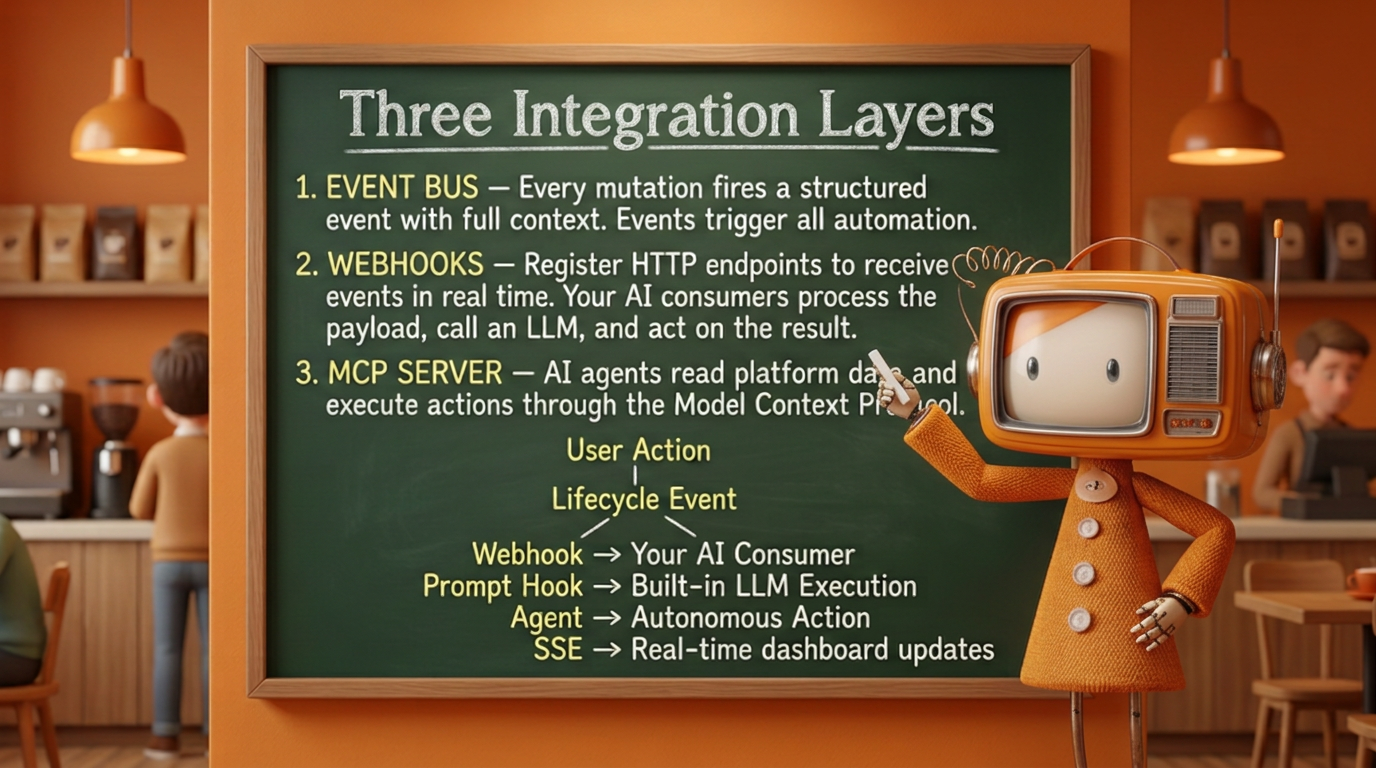
Text version of the diagram above
The AI architecture is built on three layers that work together:
- Event bus -- Every mutation in the platform fires a structured event with full context (organization, actor, record, workflow, step, timestamp). Events are the trigger for all automation.
- Webhooks -- Register HTTP endpoints to receive events in real time. Your external AI consumers process the payload, call an LLM, and act on the result. See the Webhooks guide.
- MCP server -- AI agents read platform data and execute actions programmatically through the Model Context Protocol. See the MCP server guide.
Every user action produces a lifecycle event, and each lifecycle event fans out to four kinds of consumers:
- Webhook → your AI consumer
- Analyze event context
- Call MCP tools (or API) to take action
- Return result → new event
- Prompt hook → built-in LLM execution
- Resolve skills + persona from pack
- Render template with event context
- Call OpenAI / Anthropic
- Log result to execution log
- Agent → autonomous action
- Resolve skills + persona + allowed actions
- Reason over event with domain knowledge
- Execute actions (create, route, assign, approve)
- Each action → new lifecycle event
- SSE → real-time dashboard updates
Prompt templates
Prompt templates are configurable, reusable AI prompts stored in the platform. Each template defines what to send to an LLM when triggered.
A template includes:
| Field | Description |
|---|---|
label | Human-readable name |
system_prompt | The system message that sets the LLM's role and behavior |
user_prompt_template | The user message, with placeholders for event context |
response_instructions | Output format guidance for the LLM |
model_provider | openai or anthropic |
model_name | The specific model to use (e.g. gpt-4o, claude-sonnet-4-20250514) |
mcp_server_ids | Optional MCP servers the LLM can call for additional context |
Templates are managed through the admin UI or the /api/prompt-templates API.
Prompt hooks
Prompt hooks connect templates to lifecycle events. When a matching event fires, wrk!ng automatically executes the associated template.
A hook specifies:
| Field | Description |
|---|---|
hook_point | When to fire -- currently on_event for event-driven hooks |
prompt_template_id | Which template to execute |
event_types | Which events trigger this hook (empty array = all events) |
workflow_id | Optional: scope to a specific workflow |
step_id | Optional: scope to a specific step |
conditions | Optional: JSON conditions for fine-grained filtering |
is_active | Enable or disable without deleting |
Hooks support per-hook model overrides. If a hook specifies a model_provider and model_name, those take precedence over the template defaults.
Execution flow
When a lifecycle event fires, the prompt system follows this sequence:
- Event fires -- A user creates a task, submits feedback, completes a workflow step, etc.
- Hook matched -- The prompt dispatcher finds all active hooks where
hook_point = 'on_event'and the event type matches the hook'sevent_typesfilter. - Skills, persona, and agent resolved -- The engine collects all active skills relevant to the triggering pack, workflow, or step, resolves the persona, and determines whether an agent should handle this event. These are injected into the prompt context alongside the template.
- Template rendered -- The template's
user_prompt_templateis rendered with the event'sEventContext(org, actor, record, workflow, step, timestamp). - LLM called -- The rendered prompt is sent to OpenAI or Anthropic, along with the system prompt, skill instructions, persona definition, and response instructions. If an agent is handling the event, its action plan and permitted tools are included. If MCP servers are configured, the LLM can make tool calls for additional context.
- Agent actions executed -- If an agent produced action directives (create task, route form, assign user), the platform executes each one within the agent's
allowed_actionsscope. Each action fires its own lifecycle event. - Result logged -- The full execution (input, output, model, tokens used, latency, actions taken) is logged to the
prompt_execution_logtable for auditing and debugging.
Skills, Personas, and Agents
Packs are containers for everything that makes a capability work -- and that includes far more than data. A pack can ship Skills, Personas, and Agents alongside (or instead of) forms, workflows, and data models. A pack that contains only skills, personas, and agents -- with no new entities at all -- is a first-class pack that layers domain intelligence onto your existing workflows.
Skills
A Skill is a scoped body of knowledge that teaches the LLM how to handle a specific domain or topic. Skills are bundled with packs and automatically injected into the prompt context when relevant events fire.
| Field | Description |
|---|---|
label | Human-readable name (e.g. "OSHA Compliance Review") |
domain | The domain this skill covers (e.g. construction.safety, hr.onboarding) |
instructions | Detailed rules, definitions, and reasoning guidelines for the LLM |
examples | Few-shot examples that demonstrate correct reasoning |
constraints | Boundaries the LLM must respect (e.g. "never approve without a signature") |
pack_id | The pack this skill belongs to |
For example, the Construction industry pack ships with skills like:
- Change order validation - Teaches the LLM what constitutes a valid AIA G701 change order, required fields, approval thresholds, and common rejection reasons.
- OSHA daily log review - Rules for reviewing daily safety logs: required sections, weather documentation, incident reporting format, and escalation triggers.
- Lien waiver classification - How to classify conditional vs. unconditional waivers, verify amounts against invoices, and flag discrepancies.
Skills compose naturally. A prompt hook on a construction workflow step can activate multiple skills simultaneously -- the LLM receives the combined knowledge and reasons across all of them.
Personas
A Persona defines who the LLM should be when responding. While skills provide domain knowledge, personas control tone, authority level, communication style, and decision-making posture.
| Field | Description |
|---|---|
label | Human-readable name (e.g. "Senior HR Business Partner") |
role_description | Who this persona is and what authority they carry |
communication_style | How the persona communicates (formal, coaching, direct, empathetic) |
decision_framework | How the persona weighs trade-offs and makes recommendations |
escalation_rules | When the persona should defer to a human instead of deciding |
pack_id | The pack this persona belongs to |
Personas enable the same data and event to produce fundamentally different AI responses depending on context:
- A Compliance Officer persona reviewing an expense report flags policy violations with regulatory citations and recommends denial.
- A Team Lead persona reviewing the same report asks clarifying questions and suggests how to resubmit correctly.
- A Finance Analyst persona summarizes the report's budget impact and forecasts category trends.
Agents
An Agent is an autonomous worker that combines a persona, one or more skills, a model, and a set of MCP tools into a single unit that can act on events without human intervention. While skills and personas feed into prompt hooks that produce responses, agents are designed to take actions -- completing multi-step sequences, making decisions, and driving workflows forward.
| Field | Description |
|---|---|
label | Human-readable name (e.g. "Onboarding Coordinator") |
persona_id | The persona this agent operates as |
skill_ids | Skills the agent draws on for domain reasoning |
model_provider | openai or anthropic |
model_name | The specific model to use |
mcp_server_ids | MCP servers the agent can call for data and actions |
trigger_events | Which lifecycle events activate this agent |
allowed_actions | Scoped list of actions the agent is permitted to take |
pack_id | The pack this agent belongs to |
An agent might:
- Onboarding Coordinator -- Triggered by
employee.post_create, gathers the new hire's role and department, selects the right onboarding workflow, pre-fills known fields, assigns a buddy from the team roster, and creates a welcome task for the manager. - Compliance Reviewer -- Triggered by
workflow_step.post_submiton any regulated form, cross-references the submission against active skills (OSHA rules, AIA standards, lease terms), flags non-conformances, and either approves or returns the form with specific correction instructions. - Triage Agent -- Triggered by
task.post_create, reads the task description, searches for duplicates and related work via MCP, assigns a priority and category, routes to the right team member, and posts a summary to the task thread.
Agents are bounded by their allowed_actions -- they can only do what you permit. Every action an agent takes fires its own lifecycle event, creating a full audit trail and enabling human review at any point.
How Skills, Personas, and Agents work together
When a lifecycle event fires, the platform assembles the AI context from three layers:
- Event context -- The structured payload from the lifecycle event
- Prompt template -- The authored system and user prompts
- Active skills -- All skills relevant to the pack, workflow, or step that triggered the event
- Active persona -- The persona assigned to this hook, agent, or defaulted from the pack
- Agent orchestration -- If an agent is handling this event, the agent's action plan and permitted tools
- MCP tools -- Any connected MCP servers for additional data retrieval
Skills narrow what the LLM knows. Personas shape how it communicates and decides. Agents define what it does. Together they turn a generic LLM into a domain-expert actor that operates within the guardrails your organization defines.
Packs as context, not just data
A pack does not need to introduce new database entities to be useful. Some of the most powerful packs contain no forms or data models at all -- they package skills, personas, and agents that enhance existing workflows.
Consider these examples:
| Pack type | Contains | Purpose |
|---|---|---|
| Capability pack | Forms, workflows, data models, skills, personas, agents | Full-featured domain module (e.g. Recruiting, Expenses) |
| Industry context pack | Skills, personas, agents | Layers industry-specific reasoning onto existing capability packs (e.g. "Construction Safety" adds OSHA skills and a Safety Officer persona to the base Compliance pack) |
| Topic pack | Skills, personas | Adds specialized knowledge to any workflow (e.g. "GDPR Compliance" teaches data-handling rules across all packs that process personal data) |
| Agent pack | Agents, skills | Ships autonomous workers for a specific domain (e.g. "Intake Triage" provides agents that classify and route incoming submissions) |
This composability means you can start with a capability pack for your core workflows, then layer on industry context packs, topic packs, and agent packs to deepen the AI's domain expertise without changing any data structures.
Industry packs and domain expertise
Every industry pack ships with pre-authored skills, personas, and agents tuned to that vertical:
| Pack | Example skills | Example personas | Example agents |
|---|---|---|---|
| Construction | Change orders, daily logs, RFIs, safety inspections | Project manager, Safety officer, Estimator | Daily log reviewer, Change order validator |
| Professional Services | SOW review, scope creep detection, deliverable sign-off | Engagement manager, Quality reviewer | Scope creep monitor, Deliverable checker |
| Nonprofits | Grant narrative drafting, outcome measurement, donor acknowledgment | Program director, Grant writer, Board advisor | Grant deadline tracker, Outcome reporter |
| Property Management | Lease compliance, maintenance triage, tenant communication | Property manager, Maintenance supervisor | Maintenance triager, Lease milestone monitor |
You can use the pre-authored skills, personas, and agents as-is, customize them, or author entirely new ones from scratch through the admin UI or the API.
Supported providers
wrk!ng supports two LLM providers. API keys are configured at the organization level in organization settings.
| Provider | Configuration | Models |
|---|---|---|
| OpenAI | Org-level API key (encrypted at rest) | Any model available in the OpenAI API |
| Anthropic | Org-level API key (encrypted at rest) | Any model available in the Anthropic API |
Each prompt template or hook can target a specific provider and model. This lets you use different models for different tasks -- a fast model for triage, a more capable model for detailed analysis.
MCP tool access
When a prompt template has mcp_server_ids configured, the LLM execution can call MCP tools during processing. This enables prompts that gather additional context before producing a result.
For example, a prompt hook on task.post_create could:
- Receive the new task details from the event context
- Call the
searchMCP tool to find related tasks - Call the
list_eventstool to check recent activity - Produce a priority recommendation based on all gathered context
Pack-defined capabilities
AI capabilities are not a fixed feature list -- they are defined by the packs your organization has installed. Each pack can ship prompt templates, hooks, skills, personas, and agents that activate AI at specific points in its domain.
When you install a pack, its AI capabilities become available immediately. When you deactivate or remove a pack, its prompt hooks stop firing and its skills are no longer injected into AI context.
This means your organization's AI surface area grows and changes as you add packs. The Core platform pack provides cross-cutting capabilities like form validation and submission analysis. Domain packs layer on specialized capabilities -- the Digital Café pack adds recognition moment detection, the Company pack adds announcement drafting and survey analysis, and industry packs add vertical-specific skills and agents.
See each pack's documentation for its full list of prompt templates, hooks, skills, personas, and agents.
Privacy and safety

Built-in safeguards
- AI consumers receive only the event context and payload, not the full database.
- Sensitive fields (SSN, bank accounts, passwords) are never included in event payloads.
- You control which events are forwarded and to which endpoints.
- All AI actions are logged as events, creating a complete audit trail.
- AI-generated content is flagged as machine-generated in the audit log.